
Sensor Setup
Setup Overview
Section titled “Setup Overview”Sensor setup is a quick and easy process, with only a couple steps.
- Unboxing and Assembly
- Activation
Unboxing and Assembly
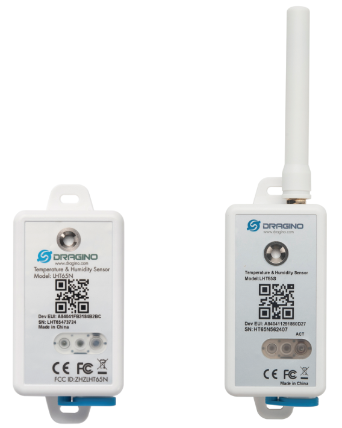
Section titled “Unboxing and Assembly”The temperature sensor will arrive in a box containing 2-3 items
- The main sensor body
- An antennae
- An optional light sensor
To assemble the sensor:
- Remove the yellow cap from the sensor main body antennae connection.
- Attach the antennae to the main sensor body.
- Remove the light sensor from its bag and plug it into the bottom of the sensor, removing the blue protective cap.
The sensor is now ready for activation.
Activation
Section titled “Activation”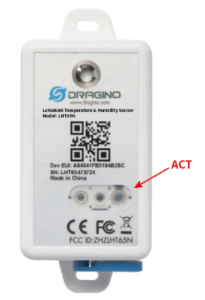
The LHT65N/S has two working modes:
- Deep Sleep Mode: The sensor doesn’t have any wireless activation. This mode is used for storage and shipping to save battery life.
- Working Mode: In this mode, the sensor will join the network and send out the sensor data to the server.
The sensor is set in deep sleep mode by default; the ACT button on the front is how you switch between modes. It is easy to miss: it sits below the LED indicator lights and looks like one of them. Press and hold it for the timings below.
| Press the ACT button | Action | What happens |
|---|---|---|
| 3 seconds | Activate device | The green LED fast blinks 5 times, and the sensor enters working mode and starts joining the network. Once it has joined, the green LED turns solid for 5 seconds. |
| 1–3 seconds | Test uplink | If the sensor is already joined, it sends data to the server. The LED blinks blue once when an external sensor such as the light sensor is connected, or red once when none is. |
| Five presses | Deactivate device | The red LED lights solid for 5 seconds. The sensor enters Deep Sleep Mode and stops communicating with the service. |
After activating the sensor, data will be sent to the service at regular intervals of 20 minutes.
Configuration
Section titled “Configuration”The sensor will be pre-configured and should appear in the proper room as data arrives.
Placement
Section titled “Placement”The sensor can be mounted on a wall using the tabs on the top and bottom. It will work sitting horizontal on a flat surface, but should be mounted permanently on a wall for the most accurate and reliable performance.
Ideally the sensor would be mounted vertically, with the antenna pointing up (if the sensor has an external antenna — not all do). The light sensor comes with double sided tape on the back, which can be used to affix the light sensor in a location on the wall that is not obstructed by anything that would cast a shadow on it.
Last reviewed 2026-10-18.