
Controller Plugin Update
Occasionally an update will be released that needs to be installed on the Innovive rack controller. Updates are specific to a customer site, so general links are not available. You should have received an email with a link to the update specific to your site.
Follow this guide to update rack controllers with the latest RackNet plugin.
Download the controller plugin update
Section titled “Download the controller plugin update”You should have received an email with links to download the update. The update is specific to your facility, so please use only these links and do not share them.
USB Flash Drives
Section titled “USB Flash Drives”From the initial setup or a previous update, you may have 2 USB flash drives, labeled similar to:
- Controller Update
- RackNet Config/Update
You may reuse the RackNet Config/Update USB flash drive.
Controller Generation
Section titled “Controller Generation”There are two controller generations V1 and V2, referred to as V1 and V2. The controller generation can be determined by looking at the Controller configuration screen, but knowing the controller generation is not critical. The update process will choose the correct update file.
As a general rule:
- Any controller with a built-in antenna is a V1 controller
- Any rack received after March 2021 is very likely a V2 controller
Update Filenames
Section titled “Update Filenames”The download link you received should contain two files
- racknet-v2.zip (this is the V1 update)
- innovive-controller.zip (this is the V2 update)
Download both of these files, and make sure the names do not change. Do not unzip the files.
Copy Updates to the USB Flash Drive
Section titled “Copy Updates to the USB Flash Drive”Copy both updates to the same RackNet Config/Update drive. The rack controller will choose the correct update to install.
Do not unzip the files, and make sure they are named exactly the filenames listed above.
Install the Update
Section titled “Install the Update”- Remove the USB wireless device from the rack controller.
- Insert the USB flash drive into the controller. The update will start automatically.
- After the controller restarts, press the OK button.
- Remove the USB flash drive and reinsert the USB wireless device.
Verify the Update
Section titled “Verify the Update”The updated RackNet controller plugin version is specified in the email you received. To verify this is the version installed on the rack controller:
- Press the bottom two buttons on the controller for 3-4 seconds to display the settings screens
- Navigate to the “Network Info” screen.
- Find the “Version” specified near the bottom of the string.
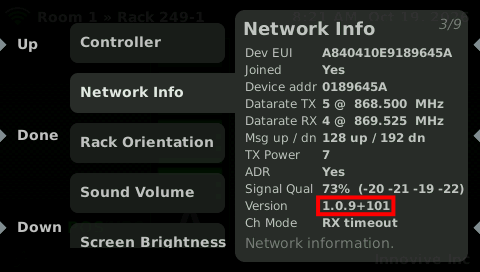
After a few minutes, the controller will register the updated plugin version with RackNet, and the updated version will be visible on the Rack Details page.
Last reviewed 2026-10-18.