
Airflow charts
Rack Airflow Visualized
Section titled “Rack Airflow Visualized”Quickly visualize a complete history of airflow data from any rack and gain insights into trends and problems. Additionally, data can be exported for further analysis.
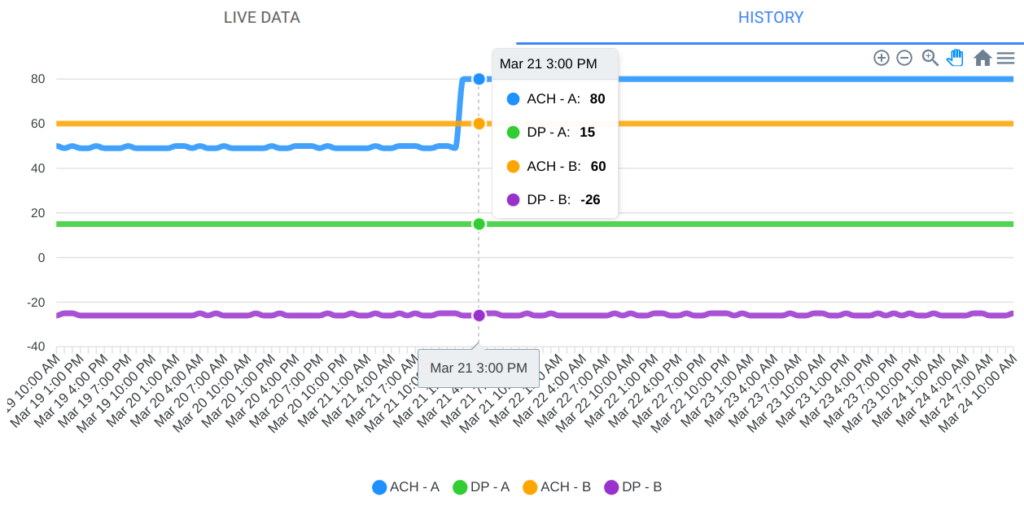
A brief demonstration
Section titled “A brief demonstration”Below is a quick demonstration of the chart features in RackNet.
- Click on any rack to view the rack details page, then click on the “History” tab to view the chart
- Click on the “Live Data” tab to return to the most recent airflow values received from a rack
- Visually see any change in airflow (from 50 ACH to 80 ACH here)
- Mouse over any data point to see all values for that time
- Zoom in and out, as well as pan right or left
- Download data as an image (PNG, SVG) or CSV (then import into a spreadsheet)
- Live updates as new data arrives
- At 00:48 in the video, notice “waiting for data…” appears
- The rack sent new airflow data to RackNet
- As data is updated, the most recent time changes
Last reviewed 2026-10-18.